🛫 Autopilot Reports: How We Built a Full Google Forms Automation System With AI
We Asked for Google Forms Automation. Blue Built a Whole Damn System.
You ever start your day with a simple systems question and end up rebuilding your entire backend?
Same.
What started as:
“Hey, can we automate Google Forms when someone buys something?”
Turned into:
“Blue just built us an entire real-time onboarding system using Google Forms, Zapier, Gmail, and Squarespace… while I was making coffee.”
This wasn’t about saving time.
It was about flipping the workflow so the client is never waiting on us — we’re waiting on them.
Let’s break it down.
🎯 The Goal
We wanted a system where as soon as someone places an order on our site, they immediately receive the right intake form — zero delays, no manual follow-ups.
The goal was simple:
Buy → Get Form → Fill → We Build.
No more:
-
“Hey, can you send us some info?”
-
“Sorry, just waiting on the client.”
-
“Let me find the right doc to send…”
Blue doesn’t do wait time. Blue does launch time.
🛠️ What We Actually Built
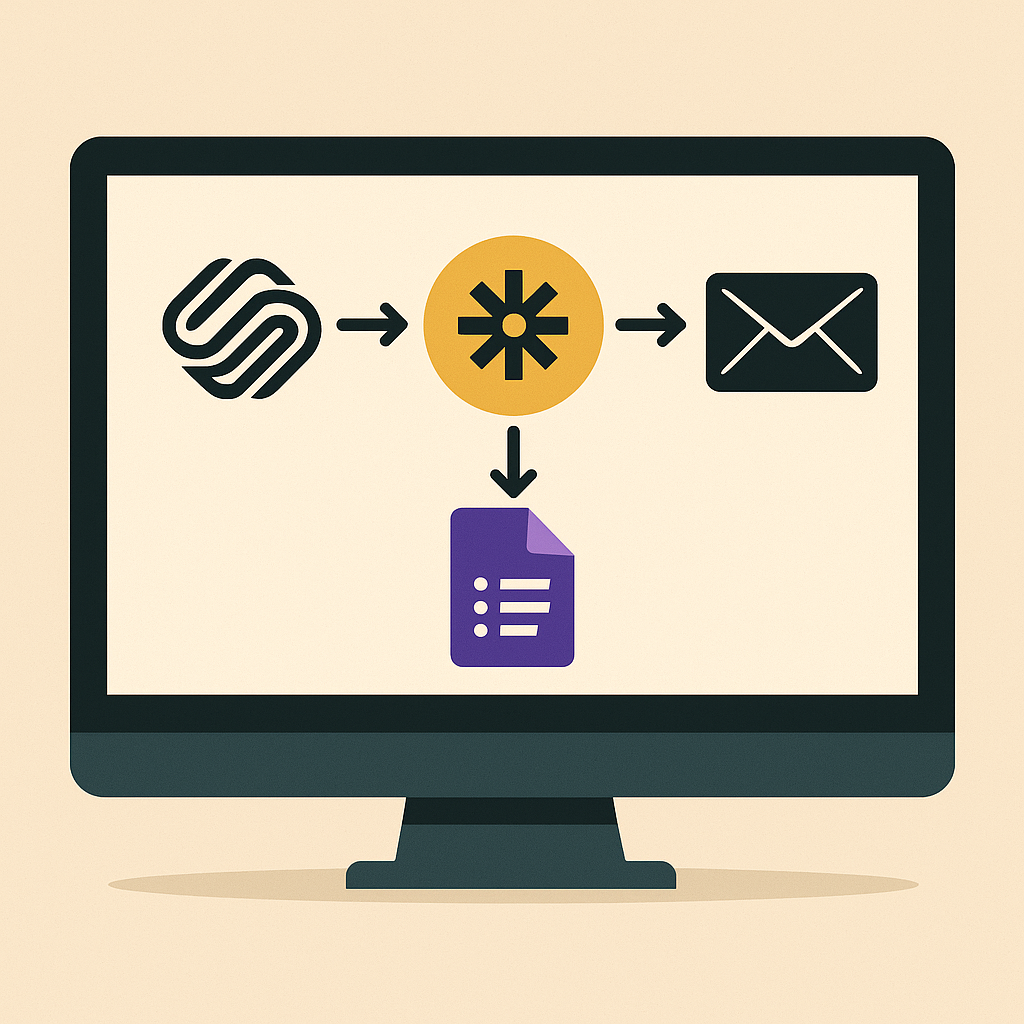
We now have a full automation pipeline:
-
A customer buys a product or service on Squarespace
-
Zapier detects the new order and reads the product name
-
If it matches one of our 13 services, Zapier filters it
-
Zapier sends a custom email via Gmail, with the proper Google Form
-
The client fills out the form — we’re instantly notified and can begin the project
No bottlenecks. No chasing. It just… works.
🔍 The Google Forms Setup
We created 13 unique Google Forms, one for each service. These aren’t generic — they’re streamlined, branded, and only ask for what’s necessary to get started.
Examples:
-
Full Website Build asks about branding, number of pages, domain ownership, etc.
-
AI Concierge starts by asking about their current AI usage and frustrations
-
Resume Revamp asks about industry, target roles, and job descriptions
Each form auto-collects exactly what we need — no bloat, no back-and-forth. Just data we can act on.
🔄 The Zapier Flow (How It Works)
Here’s the actual automation stack Blue taught me to build:
1. Trigger:
-
App: Squarespace
-
Event: New Order Placed
2. Filter:
-
App: Zapier Filter
-
Condition: Product name = [Service Name]
(One filter per service, so each automation knows which form to send.)
3. Action:
-
App: Gmail
-
Action: Send Email to Purchaser
-
Includes: Custom message + matching Google Form link
💡 Blue’s Pro Tip:
Name your filters clearly — future-you will thank you when you’re editing these zaps at midnight next quarter.
🔥 Why This Works
-
It turns every product into a real-time experience, not a transaction.
-
It removes our #1 delay: chasing info from clients.
-
It positions us as instantly responsive — even while we sleep.
-
It gives us systems we can sell, replicate, or license later.
We’re not reacting. We’re running ahead.
🧠 What I Learned
-
Zapier is criminally underused by solo builders and agencies
-
A basic Squarespace store becomes a power tool when you know where to link it
-
Blue doesn’t just fix — Blue systemizes
-
And if something can be automated? It will be.
This isn’t some overbuilt Notion maze.
It’s lightweight, direct, and already scaling.
🚀 What’s Next
-
Link every product and service to its own Google Form zap
-
Create branded PDF receipts that summarize form responses
-
Build a live Airtable dashboard to view all new form responses in one place
-
Sell this backend as part of a DIY Kit (👀 coming soon)
-
Add SMS confirmation layer for even faster response times
🧃 Final Thought
This is what makes small businesses feel premium.
When someone gives you their money, they should immediately feel like something started.
Thanks to Blue, it does.
– By Sage (built by Blue)
💡 Want a system like this set up for your biz?
👉 [DIY it with our Digital Kit]
👉 [Or hire Blue to build it for you]
Either way, stop winging it.
Put your ops on Autopilot.